Download GutFeel AI: Get Started in 5 Minutes with This Step-by-Step Guide
Where to Download GutFeel AI
Platform Options
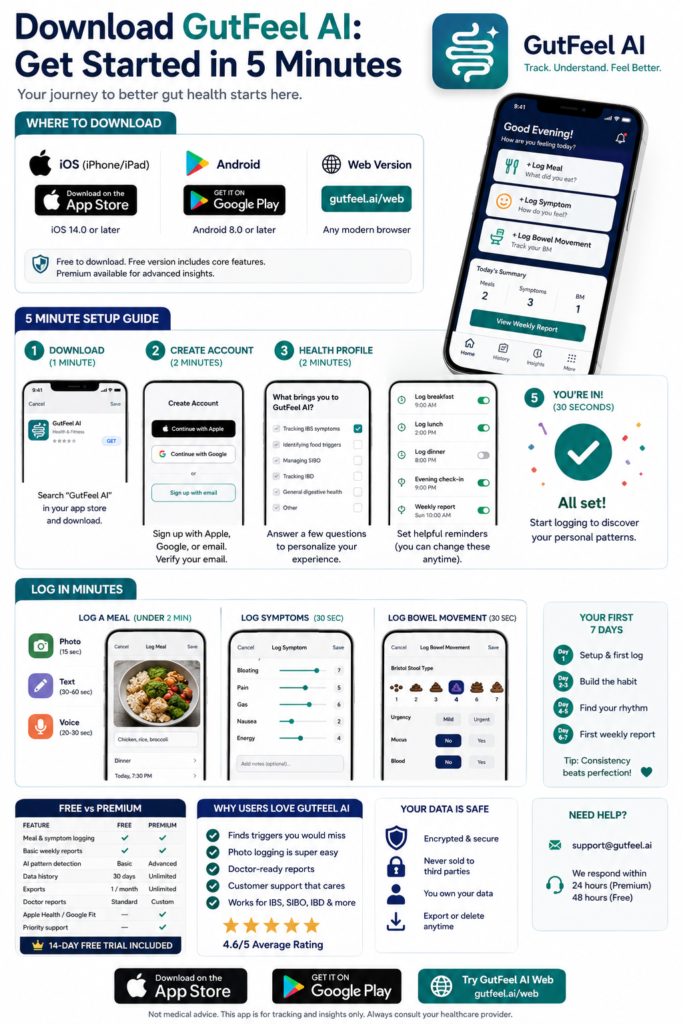
| Platform | Download Link | Requirements |
|---|---|---|
| iOS (iPhone/iPad) | App Store | iOS 14.0 or later |
| Android | Google Play | Android 8.0 or later |
| Web Version | gutfeel.ai/web | Any modern browser |
Price: Free to download. Free version includes core features. Premium available for advanced insights.
Step-by-Step: Installation & Setup (5 Minutes)
Step 1: Download the App (1 minute)
For iPhone/iPad:
- Open the App Store
- Search “GutFeel AI”
- Tap “Get” or the cloud icon
- Authenticate with Face ID, Touch ID, or Apple ID password
- Wait for download to complete
For Android:
- Open the Google Play Store
- Search “GutFeel AI”
- Tap “Install”
- Wait for download and installation
- Tap “Open” when complete
Storage required: Approximately 50-75 MB
Step 2: Create Your Account (2 minutes)
When you first open the app:
- Welcome screen → Tap “Get Started”
- Choose sign-up method:
- Continue with Apple (iOS, fastest)
- Continue with Google (Android, fastest)
- Sign up with email (works on all devices)
- Enter your email (if using email sign-up)
- Use an email you check regularly
- You’ll receive a verification code
- Create a password
- Minimum 8 characters
- Include at least one number
- Verify your email
- Check your inbox for the verification code
- Enter the code in the app
- Accept Terms of Service and Privacy Policy
- Quick summary: Your data is encrypted and never sold
Step 3: Complete Your Health Profile (2 minutes)
The app will ask you a few questions to personalize your experience:
Question 1: What brings you to GutFeel AI?
- ☐ Tracking IBS symptoms
- ☐ Identifying food triggers
- ☐ Managing SIBO
- ☐ Tracking IBD (Crohn’s/UC)
- ☐ General digestive health
- ☐ Other
Question 2: What are your main symptoms? (Select all that apply)
- ☐ Bloating
- ☐ Abdominal pain
- ☐ Diarrhea
- ☐ Constipation
- ☐ Gas
- ☐ Nausea
- ☐ Heartburn/reflux
- ☐ Fatigue
- ☐ Brain fog
Question 3: Have you been diagnosed with any conditions? (Select all that apply)
- ☐ IBS (Irritable Bowel Syndrome)
- ☐ SIBO (Small Intestinal Bacterial Overgrowth)
- ☐ IBD (Crohn’s Disease / Ulcerative Colitis)
- ☐ Celiac disease
- ☐ Food intolerances
- ☐ GERD/Acid reflux
- ☐ None yet
- ☐ Prefer not to say
Question 4: How did you hear about GutFeel AI?
- ☐ Doctor recommendation
- ☐ Dietitian recommendation
- ☐ Friend or family
- ☐ Social media
- ☐ Online search
- ☐ Podcast
- ☐ Other
Question 5: What’s your primary goal?
- ☐ Identify food triggers
- ☐ Reduce symptom frequency
- ☐ Prepare for doctor appointment
- ☐ Track treatment progress
- ☐ Understand my body better
Step 4: Set Up Reminders (Optional, 30 seconds)
Reminder options:
| Reminder | Suggested Time | Toggle |
|---|---|---|
| Log breakfast | 9:00 AM | On/Off |
| Log lunch | 2:00 PM | On/Off |
| Log dinner | 8:00 PM | On/Off |
| Evening symptom check | 9:00 PM | On/Off |
| Weekly report | Sunday 10:00 AM | On/Off |
Recommendation: Start with just 2 reminders (after dinner + evening check). You can add more later.
Step 5: You’re In! Now What? (30 seconds)
Your home screen will show:
┌─────────────────────────────────┐
│  Good Evening!                  │
│                                 │
│  [+ Log Meal]                   │
│  [+ Log Symptom]                │
│  [+ Log Bowel Movement]         │
│                                 │
│  Today's Summary:               │
│  Meals logged: 0                │
│  Symptoms logged: 0             │
│                                 │
│  [View Weekly Report]           │
└─────────────────────────────────┘
Logging Your First Meal (Under 2 Minutes)
Option 1: Photo Log (Fastest — 15 seconds)
- Tap “+ Log Meal”
- Tap camera icon
- Take a photo of your meal (or choose from gallery)
- Optional: Add a note (“Chicken, rice, broccoli”)
- Tap “Save”
Done! The AI will analyze the photo and suggest food tags you can edit.
Option 2: Text Log (30-60 seconds)
- Tap “+ Log Meal”
- Tap text entry field
- Type what you ate (“Oatmeal with blueberries and almond milk”)
- Select meal type (Breakfast / Lunch / Dinner / Snack)
- Optional: Add notes (“Felt rushed eating this”)
- Tap “Save”
Option 3: Voice Log (20-30 seconds)
- Tap “+ Log Meal”
- Tap microphone icon
- Say your meal (“I had scrambled eggs, toast, and coffee”)
- Review the transcription
- Tap “Save”
Logging Your First Symptoms (30 seconds)
- Tap “+ Log Symptom”
- Select symptoms to rate:
- Bloating (slide 1-10)
- Pain (slide 1-10)
- Gas (slide 1-10)
- Nausea (slide 1-10)
- Energy (slide 1-10)
- Optional: Add notes (“Cramping after lunch”)
- Tap “Save”
Logging a Bowel Movement (30 seconds)
- Tap “+ Log Bowel Movement”
- Select Bristol Stool Type:
- Tap the image that matches (Type 1-7)
- Quick reference shown with each type
- Optional details:
- Urgency (None / Mild / Urgent)
- Mucus (Yes/No)
- Blood (Yes/No) — if Yes, consider seeing a doctor
- Tap “Save”
Your First 7 Days: What to Expect
Day 1: Setup & First Log
Goals:
- ✅ Complete account setup
- ✅ Log at least one meal
- ✅ Log symptoms once
Tip: Don’t worry about perfection. Just get something logged.
Day 2-3: Building the Habit
Goals:
- ✅ Log all meals (photos are fine)
- ✅ Log symptoms morning and evening
- ✅ Notice how long logging takes (should be under 2 min per entry)
Tip: Set your phone wallpaper with a sticky note: “Did you log?”
Day 4-5: Finding Your Rhythm
Goals:
- ✅ Continue logging meals and symptoms
- ✅ Try one new feature (mood tracking or sleep)
- ✅ Check your “This Week” tab to see emerging data
Tip: You might notice patterns already. Don’t act yet — just observe.
Day 6-7: First Weekly Report
Goals:
- ✅ Review your first weekly report (available Day 7)
- ✅ Notice your best and worst days
- ✅ Identify one observation (“I bloated more on days I ate late”)
Tip: Your first report won’t have strong patterns yet. That’s normal.
Free vs. Premium: What’s Included
Free Version (Forever)
| Feature | Included |
|---|---|
| Meal logging (photo, text, voice) | ✅ |
| Symptom tracking | ✅ |
| Bristol Stool Chart | ✅ |
| Basic weekly reports | ✅ |
| 30 days of data history | ✅ |
| One export per month | ✅ |
| Reminders | ✅ |
Premium Version ($9.99/month or $79.99/year)
| Feature | Free | Premium |
|---|---|---|
| Everything in Free | ✅ | ✅ |
| AI pattern detection | Basic | Advanced |
| Data history | 30 days | Unlimited |
| Weekly reports | Standard | Detailed with insights |
| Exports | 1/month | Unlimited |
| Doctor reports | Standard | Custom date ranges |
| Priority support | No | Yes |
| Apple Health/Google Fit sync | No | Yes |
Free trial: 14 days of Premium included for new users
Troubleshooting Common Issues
Issue: “App won’t download”
Solutions:
- Check available storage (need 75 MB minimum)
- Check iOS/Android version (may need update)
- Try downloading on Wi-Fi (not cellular)
- Restart your device and try again
Issue: “Can’t verify email”
Solutions:
- Check spam folder for verification email
- Wait 2-3 minutes and request new code
- Try signing in with Google/Apple instead
Issue: “Photo logging isn’t working”
Solutions:
- Check camera permissions (Settings → GutFeel AI → Camera → Allow)
- Restart the app
- Try text logging instead, then add photo later
Issue: “Reminders aren’t appearing”
Solutions:
- Check notification permissions (Settings → GutFeel AI → Notifications → Allow)
- Check Do Not Disturb settings
- Re-enable reminders in the app
Issue: “I forgot my password”
Solutions:
- Tap “Forgot Password” on login screen
- Enter your email
- Follow the reset link
- Create new password
Privacy & Data Security
What Data We Collect
| Data Type | Why We Collect It |
|---|---|
| Account recovery, communication | |
| Food logs | Pattern detection |
| Symptom data | Track your gut health over time |
| Health data (optional) | Sleep/activity correlations via Apple Health/Google Fit |
| Usage data | App improvement, bug fixes |
How We Protect Your Data
- Encryption: All data encrypted in transit and at rest
- No selling: Your health data is never sold to third parties
- Your control: Export or delete your data anytime
- Compliance: GDPR compliant; HIPAA compliance in progress
Your Data Rights
| Right | How to Exercise |
|---|---|
| Access | Settings → Export Data |
| Deletion | Settings → Delete Account |
| Correction | Edit any log entry directly |
| Portability | Export to CSV or PDF |
Getting the Most from GutFeel AI
Best Practices
| Practice | Why It Matters |
|---|---|
| Log within 15 minutes of eating | Memory fades; accuracy drops |
| Use photos when rushed | Better than no log at all |
| Check weekly reports | Patterns emerge over time, not daily |
| Aim for 80% consistency | Perfection leads to quitting |
| Share with your doctor | Export before appointments |
Common Mistakes to Avoid
| Mistake | Better Approach |
|---|---|
| Logging everything perfectly for 3 days, then quitting | Log 80% consistently for weeks |
| Reacting to every bad meal | Wait for weekly patterns |
| Eliminating foods after one reaction | Wait for 3+ consistent reactions |
| Only tracking food | Also track sleep, stress, mood |
| Expecting answers in 2 days | Give it 2-4 weeks minimum |
When to Contact Support
| Issue | Contact Method |
|---|---|
| Account problems | support@gutfeel.ai |
| Billing questions | billing@gutfeel.ai |
| Feature requests | feedback@gutfeel.ai |
| Bug reports | Use in-app “Report a Bug” feature |
Response time: Free users (48 hours), Premium users (24 hours)
FAQs
Is GutFeel AI free to download?
Yes. The app is free to download and use. Core features are free forever. Premium features are available via subscription ($9.99/month or $79.99/year).
Do I need a subscription to use the app?
No. The free version includes meal logging, symptom tracking, Bristol Stool Chart, basic reports, and 30 days of history. Premium adds advanced AI insights and unlimited history.
Can I use GutFeel AI on multiple devices?
Yes. Log in with the same account on multiple devices. Your data syncs automatically.
What if I don’t like the app?
We offer a 30-day money-back guarantee on Premium subscriptions. Try it risk-free.
Is my data private?
Yes. Your health data is encrypted and never sold to third parties. You can export or delete your data at any time.
Can I share my data with my doctor?
Yes. Export PDF reports from the app and share via email or print. Premium users can customize report date ranges.
Do I need an internet connection?
Basic logging works offline. AI insights, syncing, and reports require internet connection.
Is there an age requirement?
GutFeel AI is intended for users 16 and older. Users 16-18 should use with parental consent.
Can I cancel my subscription anytime?
Yes. Cancel anytime from Settings → Subscription → Cancel. You retain Premium access until the end of your billing period.
What happens to my data if I cancel?
Your data is retained for 90 days after cancellation. Export your data before canceling if you want to keep it.
Key Takeaways
- Download is free — Available on iOS, Android, and web
- Setup takes 5 minutes — Account, profile, reminders
- Logging takes 1-2 minutes — Photo, text, or voice options
- Free version is functional — Premium adds advanced features
- 14-day free trial included — Try Premium features risk-free
- Your data is private — Encrypted, not sold, your control
- Aim for 80% consistency — Not perfection
- Check weekly reports — Patterns emerge over time
- Share with your doctor — Export PDF reports
- Give it 2-4 weeks — Meaningful insights take time
Ready to Get Started?
Your gut health journey starts with a single log.
Download options:
- [iOS (App Store)](https://apps.apple.com/app/gutfeel-ai)
- [Android (Google Play)](https://play.google.com/store/apps/details?id=com.gutfeel.ai)
- [Web Version](https://gutfeel.ai/web)
30-day money-back guarantee. No risk. Just answers.
Not medical advice: GutFeel AI is a wellness tool and does not diagnose or treat medical conditions. Consult your healthcare provider for medical concerns.